Every RTK user knows the moment: the rover is set up, corrections are arriving, and the status sits on Float instead of Fixed. Until it fixes, your position can be off by decimetres or more, which is not good enough for layout, control or as-builts.
This guide explains what Fixed, Float and Single actually mean, the usual reasons a rover will not fix, and a quick field checklist for getting back to a fixed solution on WizNET.
Key Takeaways
- Fixed means the receiver has resolved the carrier-phase ambiguities and is giving a centimetre-level position.
- Float means corrections are arriving but the solution has not resolved; Single means no corrections are being used.
- Most fix problems come from the sky view, the data connection, or the mountpoint settings.
- Tracking GPS, GLONASS, Galileo and BeiDou gives the receiver more satellites to work with in difficult spots.
- Always confirm a new fix on a known point before relying on it.
Fixed, Float and Single Explained
- Fixed: the receiver has resolved the whole number of carrier-phase cycles to each satellite. With good corrections, this gives centimetre-level accuracy. This is the only status to measure with.
- Float: corrections are being used, but the cycle count is still an estimate. Accuracy is typically decimetre-level and can drift.
- Single (or Autonomous): no corrections are being applied. The position comes from satellites alone and can be off by a metre or more.
Some controllers also show DGPS, which uses corrections for code positioning only. Treat it like Float: fine for navigation, not for survey work.
Why a Rover Will Not Fix
1. Blocked or reflected signals
Trees, buildings, steep slopes and vehicles block satellites or bounce signals into the antenna (multipath). The receiver then has too few clean signals to resolve. This is the most common cause on Vancouver Island job sites and in city cores.
2. Too few satellites or poor geometry
If the visible satellites sit in one part of the sky, the solution is weak even when the count looks fine. Tracking all four constellations helps a lot. WizNET supports GPS, GLONASS, Galileo and BeiDou, so make sure all are enabled on your receiver.
3. Corrections arriving late or not at all
Network RTK relies on a data connection. A weak cell signal delays corrections, and old corrections cannot be used to fix. Watch the correction age on your controller: if it keeps climbing, the problem is the connection, not the sky.
4. Wrong mountpoint or format
If your receiver does not understand the correction format, it may connect but never fix. On WizNET, start with the VRS mountpoint (RTCM32-MSM), try the nearest single base (RTCM-3X-MSM) next, and use the RTCM-30 streams only for older receivers.
5. Receiver settings
Disabled constellations, a high elevation mask or an outdated firmware version can all slow or prevent a fix. Check them before blaming the network.
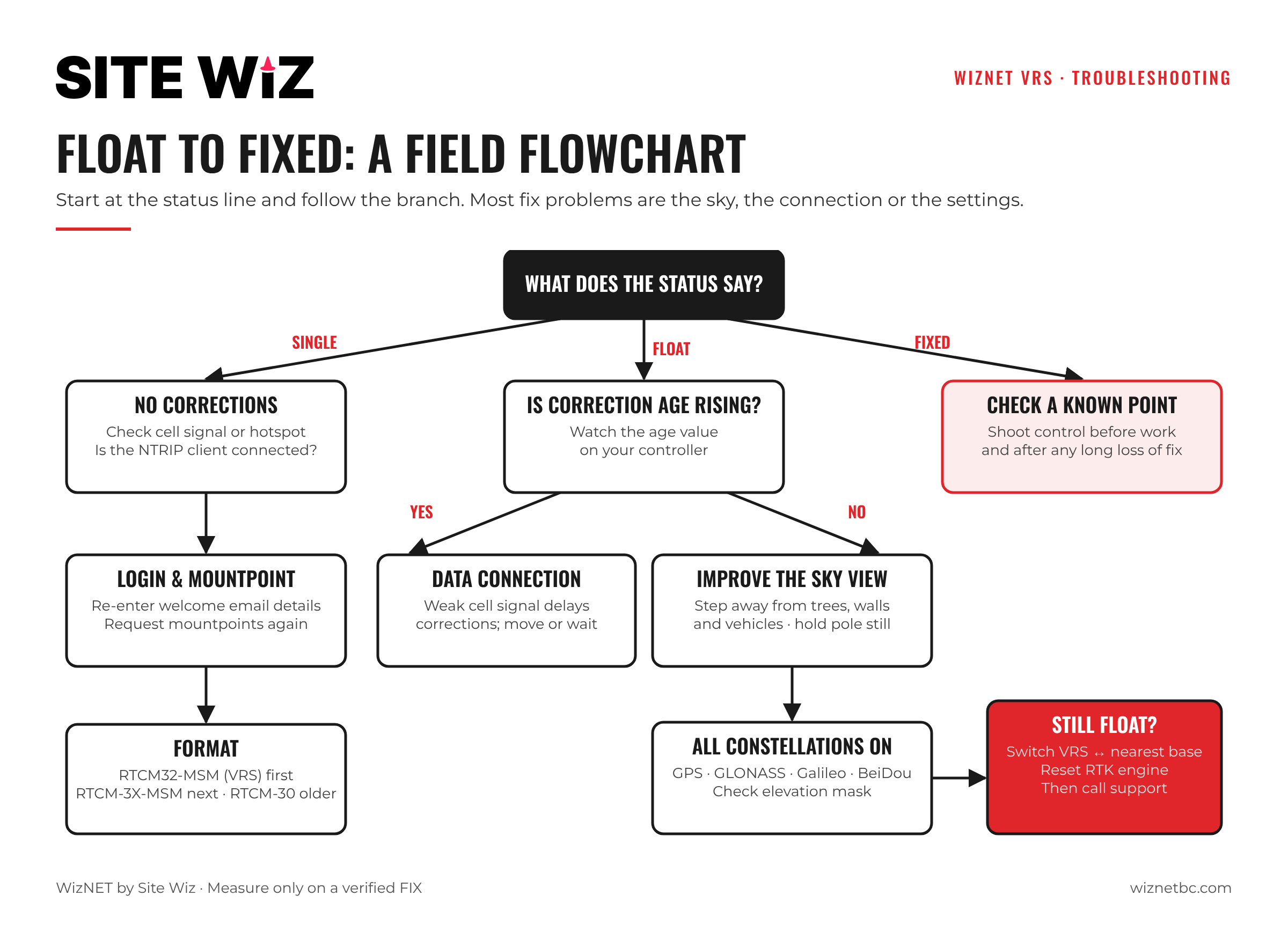
Field Checklist: From Float to Fixed
- Check the status line. Single means no corrections: go to step 2. Float means corrections are arriving: go to step 4.
- Check the data connection. Is there cell signal or a hotspot? Is the NTRIP client connected?
- Check the login and mountpoint. Re-enter the details from your WizNET welcome email and request the mountpoint list again.
- Improve the sky view. Step away from trees, walls and vehicles. Even a few metres can change the result.
- Enable all constellations and check the elevation mask is not set too high.
- Give it time. Hold the pole still and level. A fix in a difficult spot can take noticeably longer than in the open.
- Try the other mountpoint type. Switch between VRS and the nearest single base.
- Reset the RTK engine if your controller offers it, to force a fresh initialization.
When the Fix Keeps Dropping
A fix that comes and goes usually points to a marginal environment rather than a setup problem. Common patterns:
- Drops as you walk under trees: plan shots so the antenna has the clearest possible sky, or set temporary points in the open and use a total station under canopy.
- Drops in certain areas of a site: often a cell dead spot. Note where it happens and check the correction age there.
- Drops near buildings or equipment: multipath. Move the rover a little and re-check.
Our guide on multi-constellation GNSS for BC field work covers difficult environments in more detail.
Trust, but Verify
A receiver can occasionally report a fix that is wrong, especially in heavy multipath. Before starting work, and after any long loss of fix, shoot a known control point and compare. If the check is outside your tolerance, re-initialize and check again.
Setting up a new receiver? See our step-by-step guides for Emlid Reach and Topcon MAGNET Field and Pocket-3D.
Frequently Asked Questions
Can I measure in Float?
Not for survey-grade work. Float positions can be off by decimetres and can drift. Use them for navigation only.
Why does my rover fix in the open but not under trees?
Tree canopy blocks and reflects satellite signals. The receiver has fewer clean signals and cannot resolve the solution.
Does the WizNET mountpoint affect how fast I fix?
It can. VRS (RTCM32-MSM) is the best choice for most work. If you have trouble, try the nearest single base (RTCM-3X-MSM).
What if I still cannot get a fix?
Check that you are inside the WizNET coverage area, then contact the WizNET team with your receiver model, location and the status you are seeing.