Network RTK has two links, not one. Your receiver needs a clear view of the satellites, and it needs a data connection to receive corrections from WizNET. In BC, the second link is often the weak one: valleys, logging roads, coastal inlets and the backside of hills can all leave you with one bar of cell signal or none.
This guide explains how a weak data connection affects your fix, how to spot it in the field, and practical ways to keep working when coverage is patchy.
Key Takeaways
- Network RTK needs both satellites and a data connection. Losing either one costs you the fix.
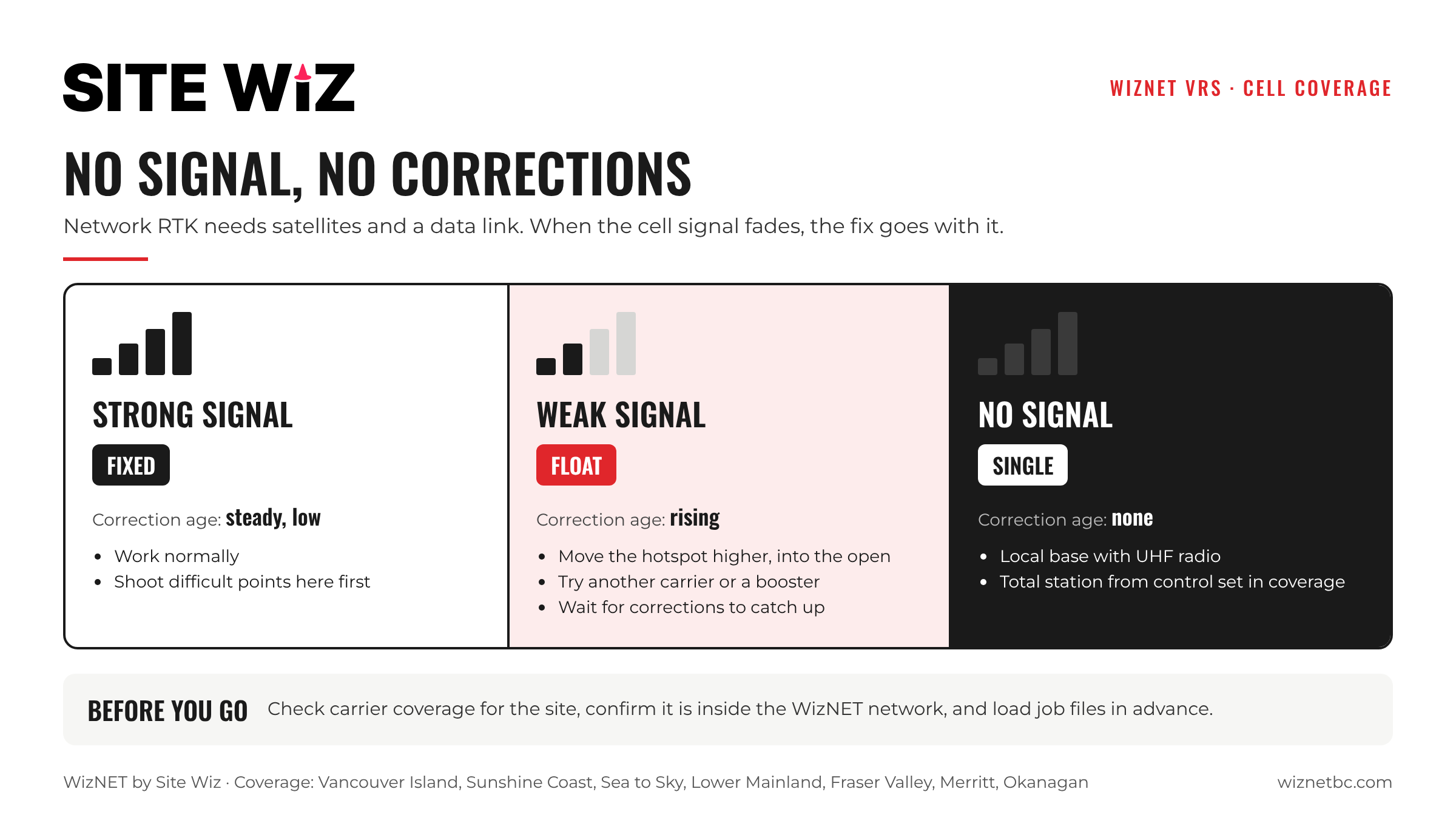
- Watch the correction age on your controller: if it keeps rising, the problem is the data link, not the sky.
- Check cell coverage for your site before you go, and know which carrier works best there.
- A hotspot placed higher, a better carrier or an external antenna can make a weak signal usable.
- Where there is no signal at all, plan for a local base with radio or a total station.
Why the Data Link Matters
RTK corrections lose value quickly. The receiver needs a steady stream of fresh corrections to keep a fixed solution. When the connection slows or drops, corrections arrive late or not at all, and the receiver falls back to Float and then Single.
Some receivers can bridge a very short gap by extrapolating the last corrections. MAGNET Field, for example, has an Extrapolation option in its network settings. That helps with brief dropouts, but it is not a substitute for a working connection.
How to Spot a Connection Problem
- Correction age keeps climbing. Most field software shows how old the latest correction is. A rising number points to the data link.
- Status drops to Single. No corrections are being used at all.
- The NTRIP client disconnects or cannot load the mountpoint list.
- The fix drops in the same spots every time, even where the sky is open. That is usually a cell dead zone.
If the correction age is steady but you still cannot fix, the problem is more likely the sky view. Our RTK Float vs Fixed guide covers both cases.
Before You Go
- Check carrier coverage maps for your site, and ask anyone who has worked there which carrier holds up.
- Check you are inside the WizNET network. See the coverage map.
- Load everything you need in advance: job files, design data and control, so the controller does not depend on the connection for anything except corrections.
- Bring a backup: a second phone on a different carrier, or a way to set up a local base if the site is known to be dead.
In the Field
- Move the hotspot. If your receiver connects through a phone, place the phone higher and in the open, for example on the truck roof, as long as you stay within range.
- Try another carrier. Coverage on Vancouver Island and in the Interior varies a lot between carriers.
- Use an external antenna or booster on the vehicle where a site is known to be marginal.
- Shoot in the good spots first. Collect points where the signal holds, then return to the difficult area.
- Re-check a known point after any long dropout before relying on new measurements.
When There Is No Signal
Some sites simply have no cell coverage. In that case, network RTK is not the right tool for that part of the job. Common alternatives:
- Local base with radio. Set up a base on a known point and send corrections to the rover by UHF radio.
- Total station. Carry control in from an area with coverage and measure conventionally.
- Control in the open, work in the dead zone. Use WizNET to set control where the signal is good, then switch methods for the rest.
Frequently Asked Questions
Does network RTK use a lot of data?
RTK corrections are a steady but small data stream. A stable connection matters more than speed.
Why do I lose my fix when the cell signal drops?
The receiver needs fresh corrections to stay fixed. When they stop arriving, it falls back to Float and then Single.
Can I use WizNET with a phone hotspot?
Yes. Many users connect their receiver through a phone hotspot. Keep the phone close to the receiver and in the open.
Where does WizNET work?
Vancouver Island, the Sunshine Coast, the Sea to Sky corridor, Greater Vancouver, the Fraser Valley, Merritt and the Okanagan from Kamloops to Osoyoos. You also need cell or Wi-Fi coverage at the site.
Ready to try it on your sites? Compare the monthly and annual plans.