Topcon receivers such as the HiPer VR work with WizNET out of the box. Whether your crew runs MAGNET Field for surveying or Pocket-3D for machine control and layout, the connection takes a few minutes once your style is set up.
This guide covers both apps, based on our MAGNET Field and Pocket-3D setup instructions: creating a WizNET style, entering your login, choosing a mountpoint and confirming a fixed solution.
Key Takeaways
- Create a dedicated survey style named WizNET, with Network RTK over NTRIP.
- Enter the server, port, username and password from your WizNET welcome email.
- Choose RTCM32-MSM for a VRS solution or RTCM-3X-MSM for the nearest single base.
- Confirm Fixed in the status screen and check that all four constellations are tracked.
- Older Topcon receivers are supported; they may need the RTCM-30 streams.
What You Need
- A WizNET subscription and the details from your welcome email.
- A Topcon receiver. The HiPer VR is the most common, but older receivers are supported too.
- A controller or tablet with an internet connection, usually its internal cellular modem.
- A site inside the WizNET coverage area.
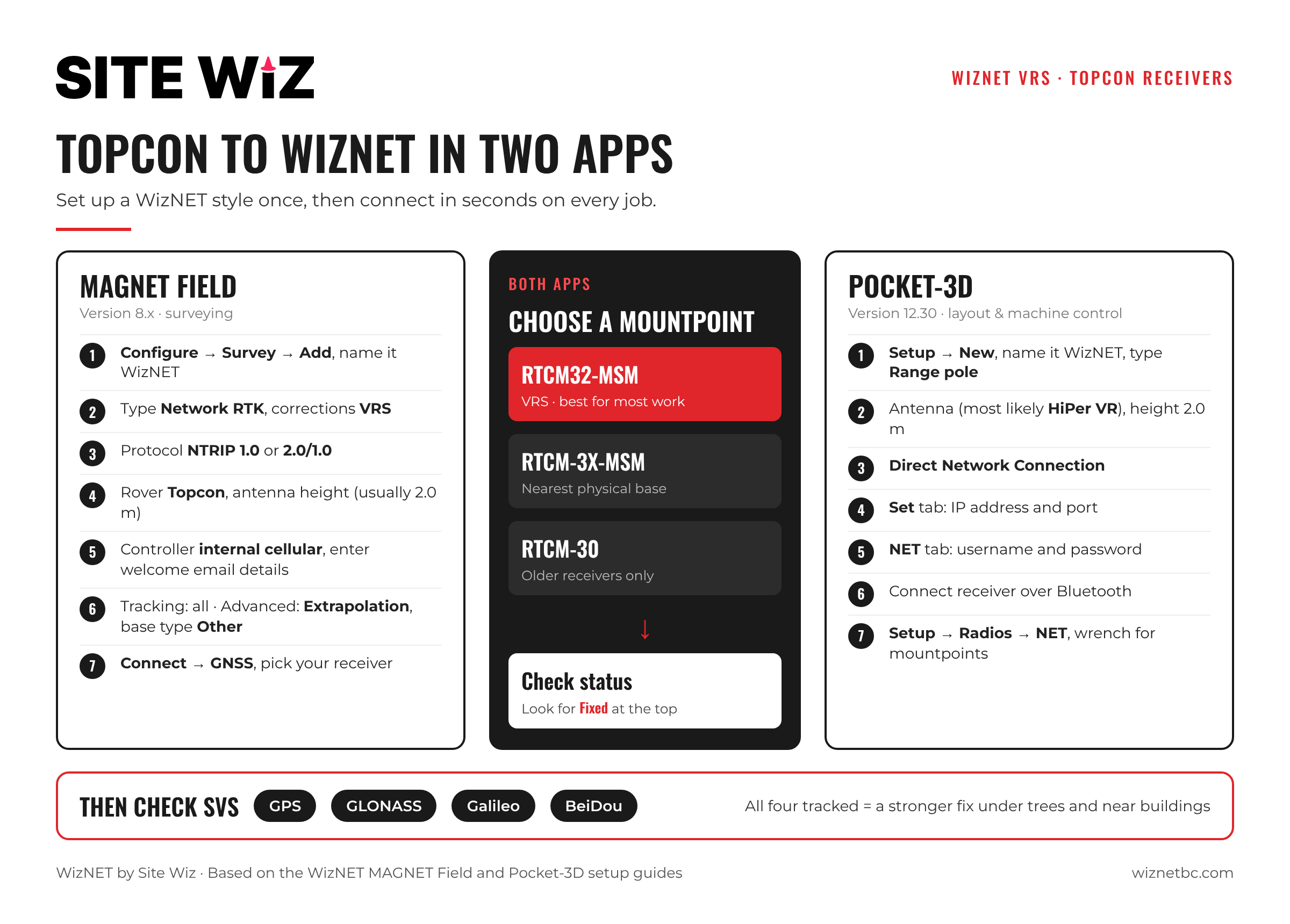
MAGNET Field Setup
These steps are for MAGNET Field version 8.x.
- From the main menu, select Configure, then Survey, then Add.
- Name the new style. We suggest WizNET. Tap the checkmark.
- Under Type, choose Network RTK. Under corrections, choose VRS.
- Under Protocol, choose NTRIP 1.0 or NTRIP 2.0/1.0.
- For the rover, select Topcon and your receiver type, then set your default antenna height (usually 2.0 m).
- For the controller, choose internal cellular, then Add and enter the details from your welcome email.
- Continue through the screens. On the tracking screen, select all options. On the advanced screen, select Extrapolation and set base type to Other.
- Finish with the green checkmark, then Connect, choose GNSS, and select your receiver from the list or by serial number.
Once connected, MAGNET Field requests the list of mountpoints from the network. Tap the blue refresh arrows if the list is empty.
Pocket-3D Setup
These steps are for Pocket-3D version 12.30.
- On the main screen, tap Setup, then New. Name the style WizNET and set type to Range pole.
- Choose your antenna type, most likely HiPer VR, and enter a default antenna height (usually 2.0 m).
- Select Direct Network Connection. Under the Set tab, enter the IP address and port.
- Under the NET tab, enter the username and password from your welcome email, then Finish.
- Connect to your receiver from the Survey tab, or tap the red box in the lower left, and select it over Bluetooth.
- Go to Setup → Radios → NET and tap the wrench button to request the available mountpoints.
Choosing a Mountpoint
- RTCM32-MSM: a VRS (Virtual Reference Station) solution. The network builds a virtual base near you. Use this for most work.
- RTCM-3X-MSM: a single baseline solution from the nearest physical base station.
- RTCM-30 streams: for some older receivers, only if the two above do not work.
Not sure which suits your job? Our guide to how RTK networks work explains the difference between VRS and single base corrections.
Confirming Your Fix
After you connect, you should see a “connected as” message. Go to Setup → Status and check that the solution shows Fixed near the top of the screen.
Then open the SVs tab and tap List to confirm you are tracking all constellations. WizNET supports GPS (USA), GLONASS (Russia), Galileo (Europe) and BeiDou (China). Tracking all four helps hold a fix under trees, near buildings and in steep valleys.
Troubleshooting
- No mountpoints listed: check the IP address, port and that the controller has a data connection, then refresh.
- Connection refused: re-enter the username and password exactly as in your welcome email.
- Float that will not fix: move to a more open spot, wait, or try the other mountpoint type.
- Older receiver will not connect: try the RTCM-30 VRS or nearest streams.
Need help with a specific receiver? Contact the WizNET team.
Frequently Asked Questions
Does WizNET work with older Topcon receivers?
Yes. The HiPer VR is the most common, but older receivers are supported. Some need the RTCM-30 streams.
Which NTRIP version should I choose in MAGNET Field?
NTRIP 1.0 or NTRIP 2.0/1.0 both work with WizNET.
Can I use WizNET for machine control?
Yes. Pocket-3D connects the same way, so layout and grade checks can run on network corrections without a site base.
Where does WizNET work?
Vancouver Island, the Sunshine Coast, the Sea to Sky corridor, Greater Vancouver, the Fraser Valley, Merritt and the Okanagan from Kamloops to Osoyoos.
How do I subscribe?
Choose a monthly or annual plan. Your login details arrive by email.